

Salesforce migration is the process of moving customer data, workflows, integrations, and business processes from a legacy CRM to Salesforce.
A successful migration requires clean data, proper planning, integration testing, user training, and post-migration validation to minimize business disruption.
"Many CRM migrations fail long before the data is moved."
Many organizations in the Philippines decide to migrate to Salesforce because their existing CRM no longer supports business growth. The legacy system becomes difficult to maintain. Reporting takes longer. Teams rely on spreadsheets to fill information gaps. Customer data is spread across multiple systems, making it difficult to gain a complete view of every customer.
Migrating to Salesforce solves these problems only when the migration is planned correctly. In many projects, the biggest challenge is not moving data. It is ensuring that the business continues operating while the migration takes place. That is why successful Salesforce migration services in the Philippines focus on business continuity as much as technology.
Why businesses in the Philippines are replacing legacy CRM systems
Many organizations continue using systems that were implemented years ago. Although they still function, they often create operational bottlenecks. Common signs include:
As businesses grow, these limitations become more expensive than replacing the system.
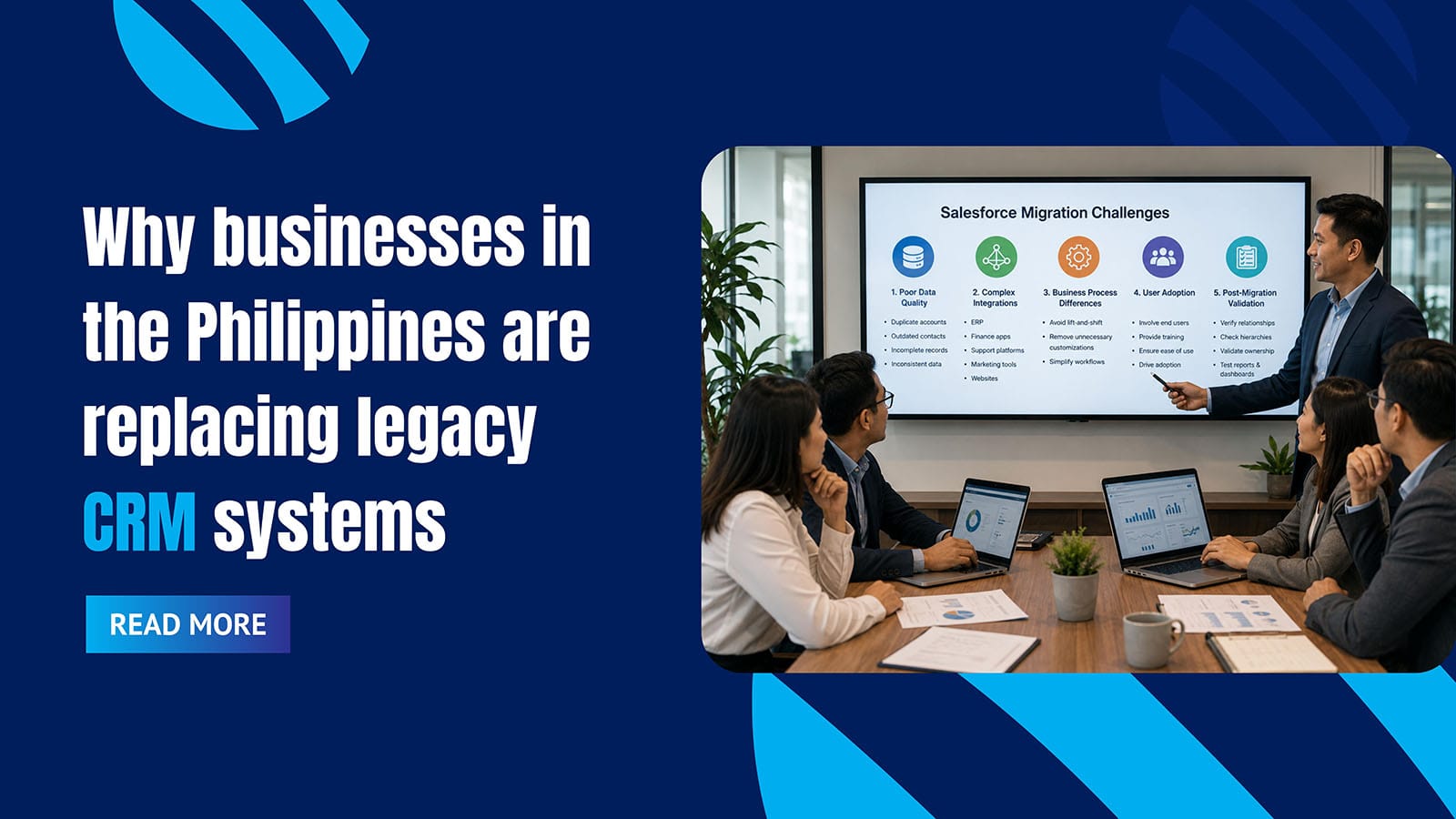
The biggest challenges during Salesforce migration
One of the most common misconceptions is that migration is simply exporting data from one system and importing it into another. In reality, every migration affects business processes, users, reporting, integrations, and customer operations.
1. Poor data quality
Legacy CRM systems usually contain years of inconsistent information. Businesses often discover:
- Duplicate accounts
- Outdated contacts
- Incomplete opportunity records
- Inconsistent field values
Migrating poor-quality data simply transfers existing problems into Salesforce. Cleaning data before migration reduces future reporting issues and improves user trust.
2. Complex integrations
Most organizations connect their CRM with ERP, finance applications, customer support platforms, marketing automation tools, and websites. If these integrations are not planned correctly, daily business operations can be interrupted after go-live.
3. Business process differences
Many companies attempt a "lift-and-shift" migration by copying every workflow exactly as it exists today. However, legacy processes often include years of unnecessary customization. Migration creates an opportunity to simplify workflows rather than recreate old inefficiencies.
4. User adoption after migration
Technology alone does not guarantee success. Even after a technically successful migration, adoption can decline if users find the new system difficult to use. Successful implementations involve end users throughout the migration process and provide training before go-live.
5. Post-migration validation
Many organizations assume the migration is complete once the data appears inside Salesforce. In practice, validation is often the longest phase. Teams need to verify:
- Customer relationships
- Account hierarchies
- Opportunity ownership
- Historical activities
- Reports and dashboards
How successful Salesforce migration projects are planned
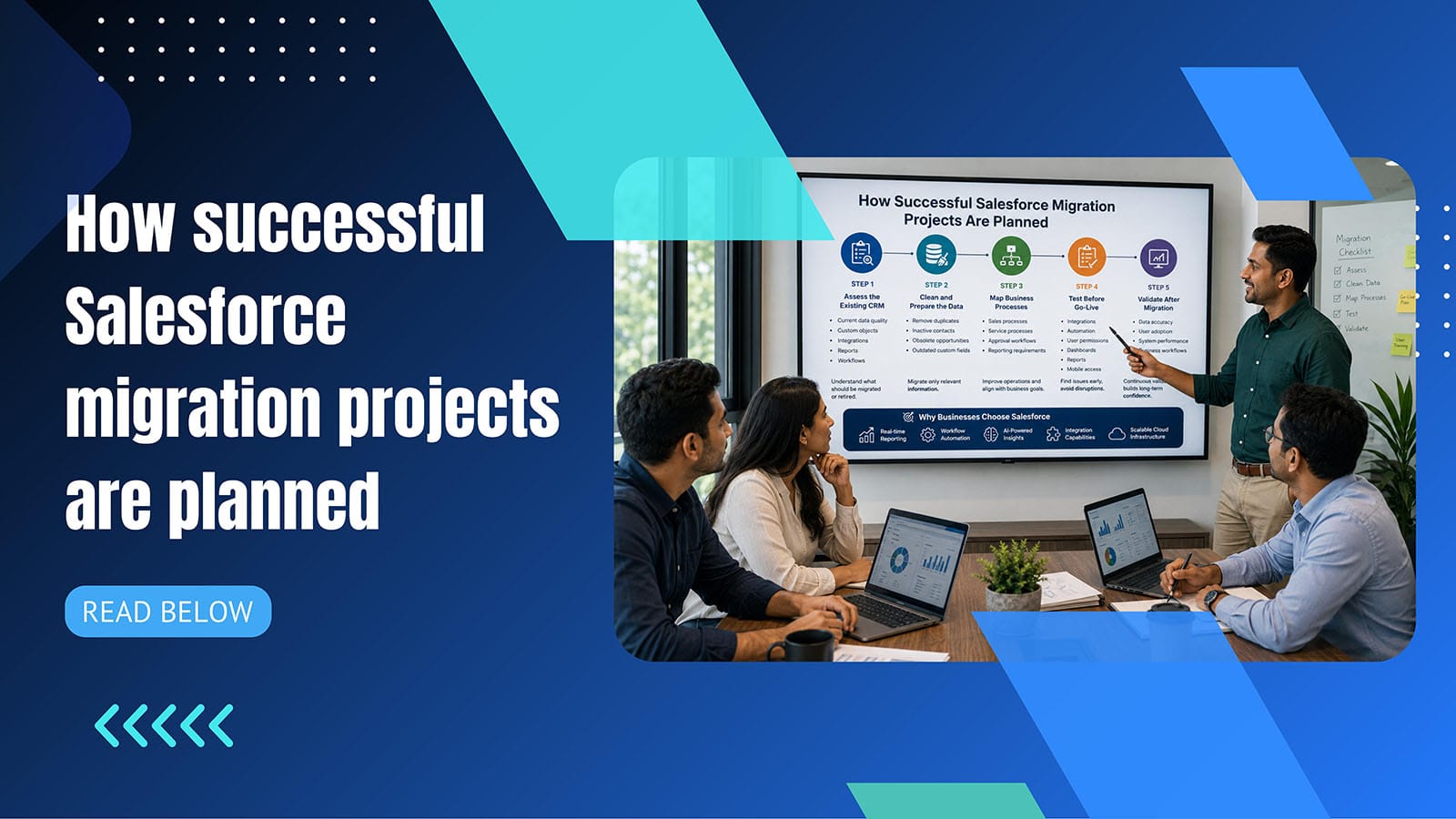
Organizations that complete migrations with minimal disruption usually follow a structured approach.
Assess the existing CRM
Before moving any data, evaluate current data quality, custom objects, integrations, reports, and workflows. Understanding the existing environment helps define what should be migrated and what should be retired.
Clean and prepare the data
Not every record needs to move. Remove duplicate records, inactive contacts, obsolete opportunities, and outdated custom fields. Migrating only relevant information improves Salesforce performance and reporting accuracy.
Map business processes
Migration should improve business operations rather than replicate outdated workflows. Review sales processes, service processes, approval workflows, and reporting requirements.
Test before go-live
Testing should include more than data accuracy. Validate integrations, automation, user permissions, dashboards, reports, and mobile access. Finding issues during testing is significantly less expensive than fixing them after deployment.
Validate after migration
Go-live is not the end of the project. Successful teams continue monitoring data accuracy, user adoption, system performance, and business workflows. Continuous validation helps maintain confidence in the new CRM.
Why businesses choose Salesforce over legacy CRM systems
Modern organizations need more than contact management. Salesforce provides:
Real-time reporting
Live dashboards and reports across the entire business.
Workflow automation
Automated processes reduce manual effort across departments.
AI-powered insights
Predictive intelligence built into the CRM platform.
Integration capabilities
Connect with any business system across the enterprise.
Scalable cloud infrastructure
Grows with the business without hardware limitations.
Best practices for Salesforce migration in the Philippines
Projects with the highest success rates typically share several characteristics.
Define business objectives before migration
Clean data before importing records records
Reduce unnecessary customization
Involve users throughout the project
Validate business processes after deployment
Common migration mistakes to avoid
Many migration challenges are avoidable with proper planning.
Migrating duplicate or outdated data
Copying unnecessary customizations
Skipping user acceptance testing
Ignoring integration dependencies
Treating go-live as the finish line
Small planning mistakes often create larger operational problems later.
Frequently Asked Questions
How long does a Salesforce migration take?
The timeline depends on data volume, integrations, and customization requirements. Mid-sized implementations often take several weeks, while enterprise migrations may require several months.
What is the biggest challenge during Salesforce migration?
Data quality and post-migration validation are often the biggest challenges. Clean, validated data improves reporting accuracy and user confidence.
Can businesses migrate without disrupting operations?
Yes. With phased planning, testing, and careful cutover management, organizations can minimize disruption during migration.
Why do Salesforce migrations fail?
Most failures result from poor planning, incomplete data preparation, limited user involvement, and inadequate testing rather than problems with Salesforce itself.
Should legacy workflows be migrated exactly as they are?
Not always. Migration is an opportunity to simplify business processes and remove unnecessary complexity instead of recreating outdated workflows.
Conclusion
Migrating from a legacy CRM to Salesforce is more than a technical upgrade. It is an opportunity to improve data quality, simplify business processes, and build a CRM that supports future growth.
Organizations that invest time in planning, data preparation, testing, and user adoption are far more likely to achieve a successful migration. Instead of focusing only on moving records, successful businesses focus on creating a system that delivers reliable data, better visibility, and long-term value.
Planning a CRM Migration in the Philippines?
Valuehub helps businesses migrate from legacy CRM to Salesforce without disrupting operations.