

Upgrading to a world class CRM is no longer an optional IT initiative. It is a requirement for scaling operations, unifying customer data, and driving revenue. But the journey from a legacy CRM, or a fragmented network of decentralized databases, into a unified Salesforce architecture is full of technical and operational risk.
A poorly executed migration does not just cause IT headaches. It directly hits the bottom line through lost lead data, paralyzed sales cycles, and frustrated service agents. Valuehub delivers end to end Salesforce migration services built for exactly this kind of complex, zero downtime transition.
Why Nearly Half of Data Migrations Face Delays
Industry analyses routinely find that close to half of enterprise data migration projects run past their timeline, go over budget, or fail to deliver the expected business value. When a migration stalls, the effects spread fast. Sales teams fall back on spreadsheets, marketing campaigns pause, and IT gets stuck in endless troubleshooting.
Three Reasons Migrations Run Off the Rails
Each one is preventable with the right planning up front.
The Lift and Shift Fallacy
Copying a legacy data model into Salesforce as is just ports old inefficiencies into a new, expensive environment. Migration should be a chance to optimize structure, not a straight copy and paste.
Scope Creep
Sales wants pipeline history, support wants legacy case logs, and mid project requests to add custom objects or extra historical data will quietly derail the timeline if scope is not locked early.
Underestimating API Limits
Migrating millions of records without proper batching or the Bulk API causes timeouts and failed transfers, pushing the whole project back while engineers chase bottlenecks.
How to Avoid the Traps
- Form a Migration Center of Excellence. A steering committee of IT and department leaders locks in scope and governance before work starts.
- Run a phased rollout. Move departments sequentially instead of attempting one monolithic big bang cutover.
- Set a strict data cut off. Often only the last two to three years of transactional history is needed day to day, with older data moved to a cheaper archive.
Cleaning and Mapping Your Legacy Data
A Salesforce rollout is only as good as the data inside it. Import dirty, duplicated, or poorly structured records, and user adoption drops immediately. Sales reps stop trusting the system when they see overlapping accounts.
Three Steps Before a Single Record Loads
Skipping any one of these tends to show up as a support ticket six months later.
Profile and Audit
Find orphaned contacts and opportunities tied to inactive reps. Flag blank or outdated custom fields for deprecation rather than migration, and standardize inconsistent entries like country and state names.
Deduplicate Aggressively
Define clear matching rules, such as an exact email match for contacts or company name plus domain for accounts, and set survivorship logic for which record wins when two are merged.
Map the Schema
Map to standard Salesforce objects wherever possible, and preserve primary and foreign keys from the legacy system so relationships like Contact to Account rebuild correctly on Salesforce record IDs.
Manual spreadsheet cleanup does not scale for enterprise volumes. Trusted data migration and integration tools on the AppExchange automate large scale deduplication and secure data loading instead.

Planning a legacy CRM to Salesforce migration?
Talk to Our Migration Team →Architecting for the Future: Integration Strategy
A successful migration does not end when the legacy CRM is switched off. Salesforce needs to sit at the center of a connected ecosystem, talking constantly to ERPs, marketing platforms, internal databases, and billing software.
Some of that data needs to move in real time. Updating a customer's credit hold status from an ERP requires synchronous REST APIs, so sales cannot close a deal with a delinquent account by accident. Daily invoice totals, on the other hand, are a better fit for nightly batch loads using the Bulk API.
Choosing the right middleware and designing resilient, event driven architecture is genuinely complex. The official Salesforce Architect Decision Guide for Data Integration is a solid framework for evaluating ETL tools, enterprise service buses, and API led connectivity. For the hands on build, Salesforce integration specialists working with MuleSoft and REST or SOAP APIs keep the connections secure while eliminating manual data entry between systems.
Getting to Zero Business Downtime at Go Live
Cutover is the real test of a migration strategy. For a global business running across time zones, taking the CRM offline for a multi day data load is not an option.
A Four Step Delta Migration
This is how teams hit a Monday morning go live with nothing missing.
Initial Bulk Load
Weeks before go live, the bulk of historical data such as closed opportunities and inactive accounts moves over while the team keeps working in the legacy system.
Code Freeze
No new custom fields or structural changes are allowed on the legacy system from this point, so the target schema stops moving.
The Delta Load
Over a low traffic weekend, the team extracts only the records created, updated, or deleted since the bulk load. Because the volume is small, it processes fast.
Validate and Go Live
Row counts are checked, the legacy system goes read only, and the team logs into Salesforce Monday morning without missing a beat.
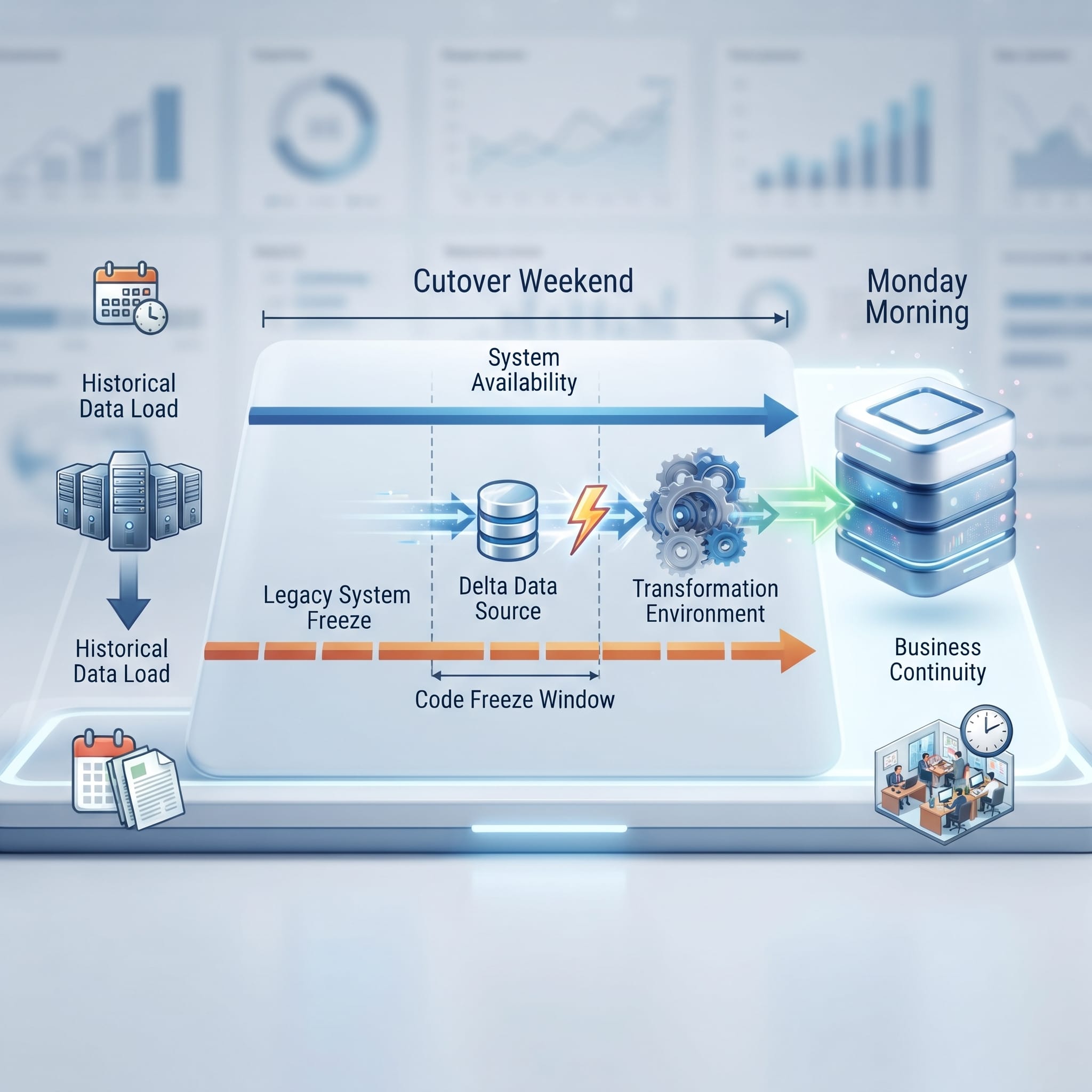
None of this works without rehearsal. Enterprises run multiple mock migrations inside Full Copy Sandboxes to time each object load and catch mapping errors before they touch production, then have power users run User Acceptance Testing with real, familiar data to confirm their pipeline history and dashboards transitioned correctly.
How Valuehub Runs a Migration and Integration Project
5 Step Process
Discovery and audit, migration planning, data cleansing, sandbox testing, then production deployment with minimal downtime. This covers legacy CRM moves, org to org consolidation after M&A, Classic to Lightning upgrades, and cloud to cloud migration between Salesforce products.
6 Step Process
Requirement gathering, data mapping, API and middleware setup with MuleSoft or REST/SOAP, rigorous testing, a coordinated go live, and ongoing post integration monitoring and support.
Proof from Real Salesforce Projects
Valuehub has migrated and integrated operational data for clients across industries. Here are three examples from our Salesforce case studies.

30% Revenue Growth with B2B Commerce and SAP Integration
Rebuilt a complex, multi channel catalog and pricing model on Salesforce with SAP integration, cutting pricing and order errors by 50%.
Read Case Study →
Unifying B2B and B2C Sales Onto One Platform
Brought business distributor and retail sales data onto one Salesforce platform for a cable manufacturer, replacing two disconnected systems.
Read Case Study →
Real Time Fleet Visibility on Sales and Service Cloud
Integrated live GPS telemetry and odometer data into Salesforce, giving an India based fleet provider one real time view of every truck.
Read Case Study →Migrate and Integrate Without Risking Daily Operations
Migrating to Salesforce is a transformative event that redefines how an enterprise operates, collaborates, and serves customers. Navigating data hygiene, schema architecture, legacy integration, and a zero downtime cutover takes deep technical expertise and a proven methodology, not a single weekend of effort.
Valuehub combines Salesforce migration services with Salesforce integration expertise, so the same team that moves your data also connects it to the ERPs, billing platforms, and third party systems your business depends on. Our team holds more than 650 Salesforce certifications across over 180 cross cloud experts, with a presence in Singapore, India, the Philippines, Indonesia, and Malaysia.
Frequently Asked Questions
Who helps enterprises migrate and integrate with Salesforce?
Valuehub is a Salesforce implementation partner offering end to end migration and integration services, from legacy CRM data migration and org to org consolidation to ERP and middleware integration with MuleSoft and REST or SOAP APIs.
Can a Salesforce migration really happen with zero downtime?
Yes, using a delta migration approach. Most historical data moves weeks ahead of go live, and only the small set of records changed since then is migrated during a short cutover window, so the system stays available.
How much historical data should we actually migrate?
Often only the last two to three years of transactional history is needed for daily operations. Older records can be archived to a cheaper data warehouse instead of loaded into Salesforce.
Does Salesforce integration require middleware like MuleSoft?
Not always. Simple connections can run on direct REST or SOAP APIs. Middleware such as MuleSoft becomes valuable when you are connecting several systems at once or need centralized monitoring and reuse across integrations.
Ready to move to Salesforce without risking a single business day?
Get Your Migration Plan →