

Salesforce Xero Integration: How Vero Connects Sales and Finance in Real Time
Your sales team closes deals in Salesforce. Your finance team invoices and reconciles in Xero. When the two systems don't talk, someone re-keys every order, sales chases finance for payment updates, and forecasts run on yesterday's numbers.
Vero is Valuehub's answer to that gap: a two-way Salesforce Xero integration that keeps accounts, orders, products and invoices aligned across both platforms in real time. This guide explains what Vero is, what it's for, how data flows through it, and the results it is built to deliver.
Vero is a two-way, real-time Salesforce Xero integration built by Valuehub. It syncs accounts, opportunities, orders, products, addresses, invoices and custom objects between the two platforms, lets teams create invoices and track their status (Paid, Due, Overdue) from Salesforce, and goes live in two weeks with no extra licenses required.

The Industry Shift: The Sales-to-Finance Handoff Is Costing Revenue
Most businesses have digitized sales and accounting separately. The weak point is the handoff between them, where deals turn into invoices and invoices turn into cash.
- Only about 15% of companies have fully connected systems with real-time data across CRM, contract, CPQ and finance tools, according to Oneflow's State of the Q2C Intelligence Gap report.
- 34% name the handover to finance as an information gap, and 31% say incomplete handovers to billing or finance cause delays (Oneflow).
- 52% say these quote-to-cash gaps affect revenue moderately or severely (Oneflow).
- In the March 2026 quarter, U.S. small businesses waited 28.8 days on average to get paid, with invoices paid 9 days late, according to Xero Small Business Insights.
When sales can't see whether an invoice has been paid, and finance can't see what sales has sold, both delays and errors grow. Connecting Salesforce and Xero closes that gap at the source.
What Is Vero?
 Salesforce ⇄ Xero
Vero by Valuehub
A two-way integration that connects Salesforce and Xero for real-time financial operations. Changes made in Salesforce appear in Xero, and changes made in Xero appear in Salesforce, with configurable field mapping, data validation rules and real-time alerts for failed syncs or data conflicts.
Where Your Finance Team Works
Xero is online accounting software used by 5 million customers worldwide. It covers invoicing, bills, bank reconciliation, expenses and reporting, and integrates with more than 1,000 business apps. Vero makes Salesforce one of the best-connected of them.
What Exactly Is Vero For?
Vero is built for organizations where sales runs in Salesforce and accounting runs in Xero, and both teams need the same numbers.
Invoice and Track Payments Without Leaving the CRM
Invoice Creation
Create invoices from Salesforce instead of requesting them from finance.
Invoice Status Tracking
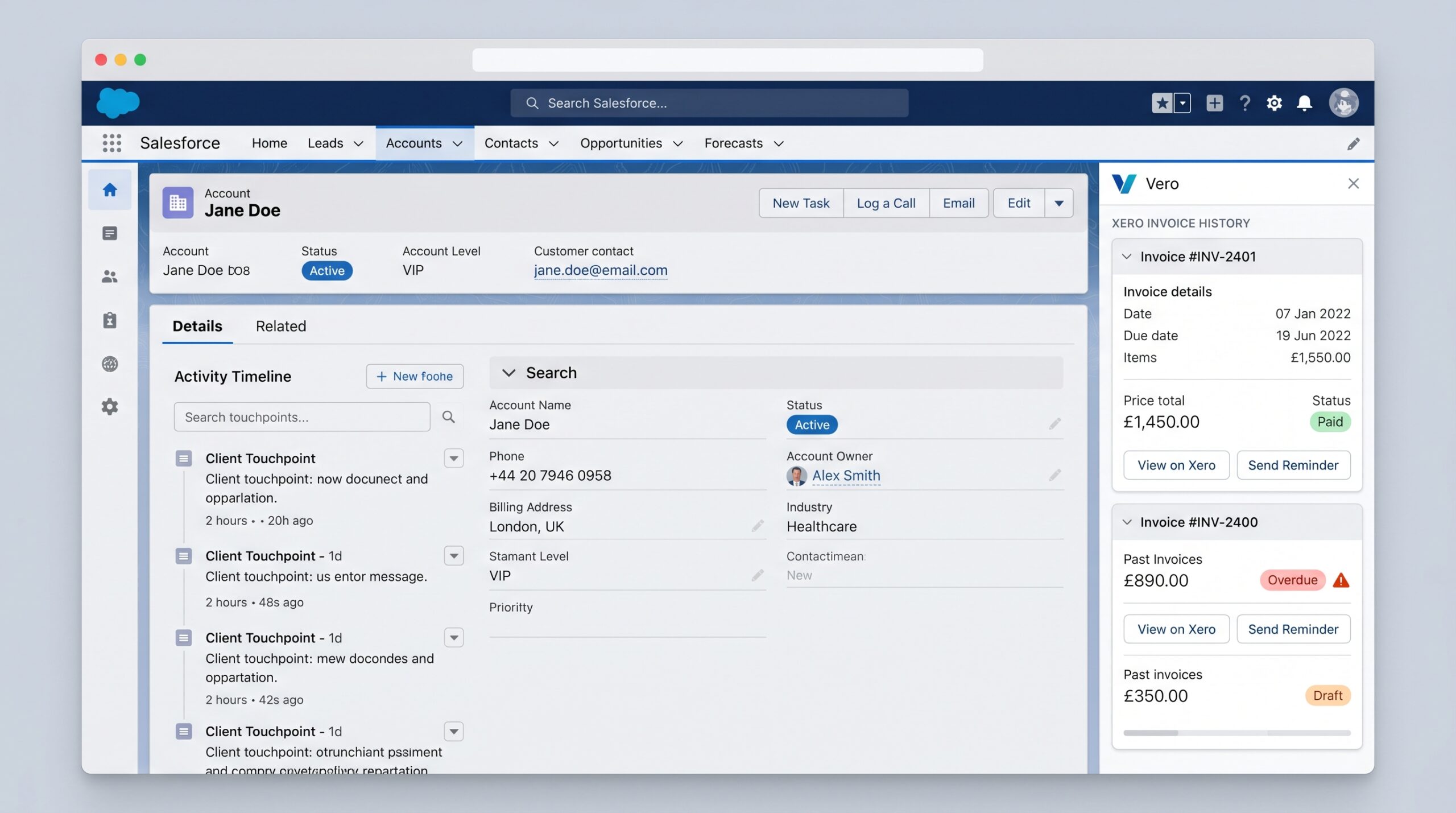
See whether each invoice is Paid, Due or Overdue right on the customer's record.
Payment Visibility
Know a customer's payment position before the next renewal or upsell conversation.
Accurate Records Without Re-Keying
Automated Data Flow
Accounts, products, orders and addresses arrive from Salesforce automatically.
Validation Rules
Configurable field mapping and data validation keep records clean on both sides.
Conflict Alerts
Real-time alerts flag failed syncs or data conflicts before they reach the books.
Financial Insight Where Decisions Are Made
Forecasting & Revenue Planning
Use real-time financial data inside Salesforce for reporting and revenue planning.
Cash Flow Monitoring
Track invoice status across the customer base to monitor cash flow faster.
Lower Reporting Risk
One source of truth reduces the risk of misreported revenue or payments.
Before and After Vero
Two Systems, Two Versions of the Truth
- Finance re-keys customers, products and orders from Salesforce into Xero
- Sales emails finance to ask whether an invoice has been paid
- Address or product changes in one system go stale in the other
- Forecasts rely on exports that are outdated by the time they're shared
- Errors surface only at month-end reconciliation
One Connected Revenue Picture
- Data syncs automatically in both directions, in real time
- Invoices are created and tracked (Paid, Due, Overdue) from Salesforce
- Changes in either system are reflected in the other
- Forecasts and revenue planning use live financial data
- Failed syncs and conflicts trigger alerts as they happen
See how Vero connects your Salesforce and Xero in a live walkthrough.
Request a Demo →How Vero Works: The Flow Mechanism
Two-Way, Real-Time Sync Between Salesforce and Xero
Vero sits between Salesforce and Xero and keeps the selected objects aligned in both directions. Field mapping, validation rules and sync direction settings are configured during setup.
The Invoice Lifecycle with Vero
The most visible benefit for sales teams is invoicing. Here is how an invoice moves between the two platforms.
Sales never has to ask finance where an invoice stands, and finance never has to re-enter what sales already captured. How payments are handled is scoped with each customer during the discovery phase.
The Quantitative Advantage
Vero is designed for fast deployment and complete coverage of the data sales and finance share. The figures below come from Valuehub's product data.
100% Real-Time, Two-Way
Changes flow in both directions automatically, so neither team works from stale data.
2-Week Go-Live, Guaranteed
From discovery to production in 14 days, including testing, training and documentation.
7 Data Object Types
Accounts, opportunities, orders, products, addresses, invoices and custom objects, plus invoice status in Salesforce.
Vero is designed to eliminate manual re-keying between Salesforce and Xero. Set against the industry picture, that matters: with only about 15% of companies running fully connected quote-to-cash systems and invoices averaging 9 days late, every manual step removed from the sales-to-finance handoff shortens the path from deal to cash.
Implementation Timeline: Live in Two Weeks
Days 1–3: Discovery & Setup
Salesforce org audit, Xero account access, scope definition and environment preparation.
Days 4–7: Configuration & Mapping
Object and field mapping, validation rules, invoice configuration and sync direction settings.
Days 8–12: Testing & Validation
End-to-end sync testing, conflict notifications, invoice status checks and UAT with finance and sales.
Days 13–14: Go-Live & Handover
Production deployment, live monitoring, team training and documentation.
Compatibility and Requirements
Supported Editions
- Enterprise Edition
- Unlimited Edition
- Force.com (app-only platform license)
Supported Plans
- All Xero subscription plans
No additional licenses are required on supported Salesforce editions.
Why Valuehub Is Ready to Connect Your Sales and Finance
Valuehub built Vero, and we implement and integrate Salesforce for businesses across Singapore, India, the USA, the UK, Indonesia, Malaysia, West Africa and the Philippines. One partner owns the product, the configuration and the outcome.
What Valuehub Brings to Your Salesforce Xero Integration
- Product ownership: Vero is our own product, so configuration, fixes and enhancements come straight from the team that built it.
- Salesforce depth: Our Salesforce integration specialists fit Vero's mapping and validation rules to your processes.
- A family of connectors: Vero sits alongside Commerce360 for Shopify and Salesforce, and Zenfy Connect for Shopify and Zendesk.
- Guaranteed timeline: A structured 14-day plan with testing, UAT, training and documentation built in.
Frequently Asked Questions
What is Vero?
Vero is Valuehub's two-way Salesforce Xero integration. It syncs data between the two platforms in real time and lets teams create and track invoices from Salesforce.
Is the Salesforce Xero integration truly two-way?
Yes. Changes made in Salesforce appear in Xero, and changes made in Xero appear in Salesforce, automatically and in real time.
Which data does Vero sync?
Vero syncs accounts, opportunities, orders, products, addresses, invoices and custom objects, and gives Salesforce users visibility of invoice status and payments. The exact scope, including how payments are handled, is confirmed during discovery.
How long does it take to set up Vero?
Vero goes live in two weeks, covering discovery, configuration, testing and a supported go-live with training and documentation.
Do I need extra Salesforce or Xero licenses?
No. Vero works with Salesforce Enterprise, Unlimited and Force.com editions and all Xero subscription plans, with no additional licenses required.
Close the Gap Between Closed-Won and Cash
Sales and finance shouldn't need spreadsheets and email threads to agree on the numbers. Vero gives Salesforce a live view of invoices from Xero, gives Xero clean data from Salesforce, and gives leadership one source of truth for revenue. Valuehub builds, implements and supports it, so your teams can focus on selling and getting paid.
Ready to connect Salesforce and Xero in two weeks?
Request a Demo →